Steer an agent through a segmentation
Time: about 45 minutes, about 15 of them your attention · You need: ParleML running with an agent signed in (Run ParleML, step 3). You'll end with: four customer segments for a CRM plan, chosen by you, checked by the agent, and corrected after you challenged its method.
The segments tutorial builds customer segments by hand and shows every chart. This one uses the same sample to show the other half of the product: how you steer an agent on a problem with no right answer, and what to do when its reasoning goes wrong.
You'll practise three things the classification tutorials don't cover:
- a brief that sets a stop rule and a decision you keep;
- an agent that re-checks your answer and comes back when it doesn't hold;
- a follow-up that challenges the agent's own method on a finished session.
The charts (cluster map, profiles, persona cross-tab, agent-written names) are in the by-hand tutorial and are not repeated here.
A recorded run
The numbers below come from one recorded session. Another session can take a different path. Select any screenshot to see it at full size.
1. Write a brief with limits
- On Home, open the Customer personas sample (under Start from a sample, or the Sample datasets button).
- On the dataset page, choose Ask an agent.
-
Write the brief. The recording's brief ended like this:
I run marketing for an online store and want to understand which kinds of customers we have, so that we can design a different CRM approach for each group. … The persona column comes from an older manual classification: do not use it to form the segments, but check afterwards how the segments relate to it.
Start with a quick first segmentation, then try one improvement only if the evidence suggests it would help. Show me the visual evidence, and ask me before settling on the final number of segments. Save a short report for the marketing team. This is a synthetic sample: do not register or release a model, and do not claim business impact.
-
Choose Start. It waits until ParleML has picked the task; here it starts ML delivery.
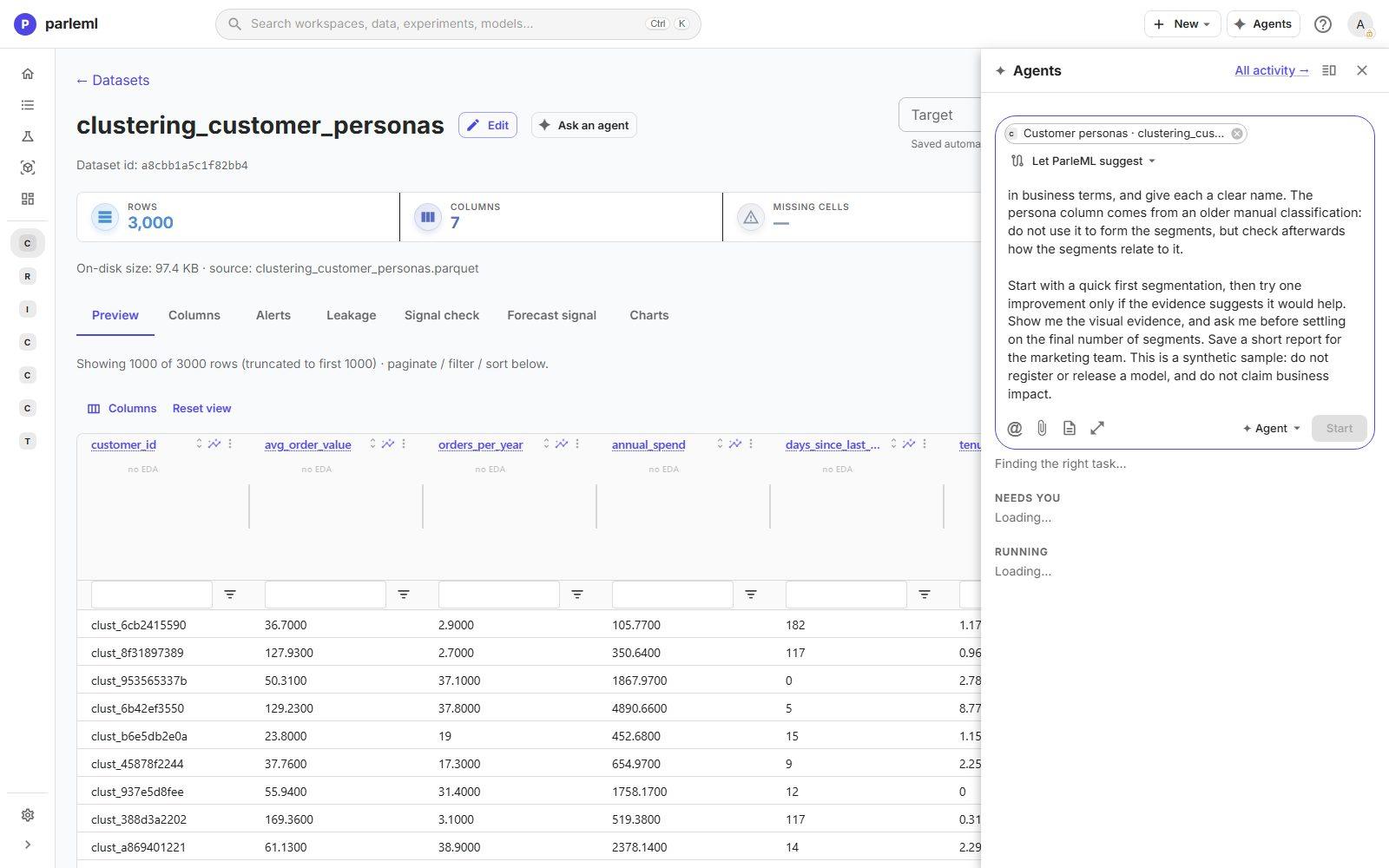
Each sentence after the goal is a control:
| In the brief | What it controls |
|---|---|
| "do not use it to form the segments, but check afterwards" | persona stays out of the features and becomes the judge |
| "one improvement only if the evidence suggests it" | A stop rule: the agent can't keep iterating on its own taste |
| "ask me before settling on the final number" | A decision that stays yours, asked as a form |
| "do not register or release a model" | The work ends at a report |
2. Read the first decision and its evidence
The agent ran two experiments and stopped:
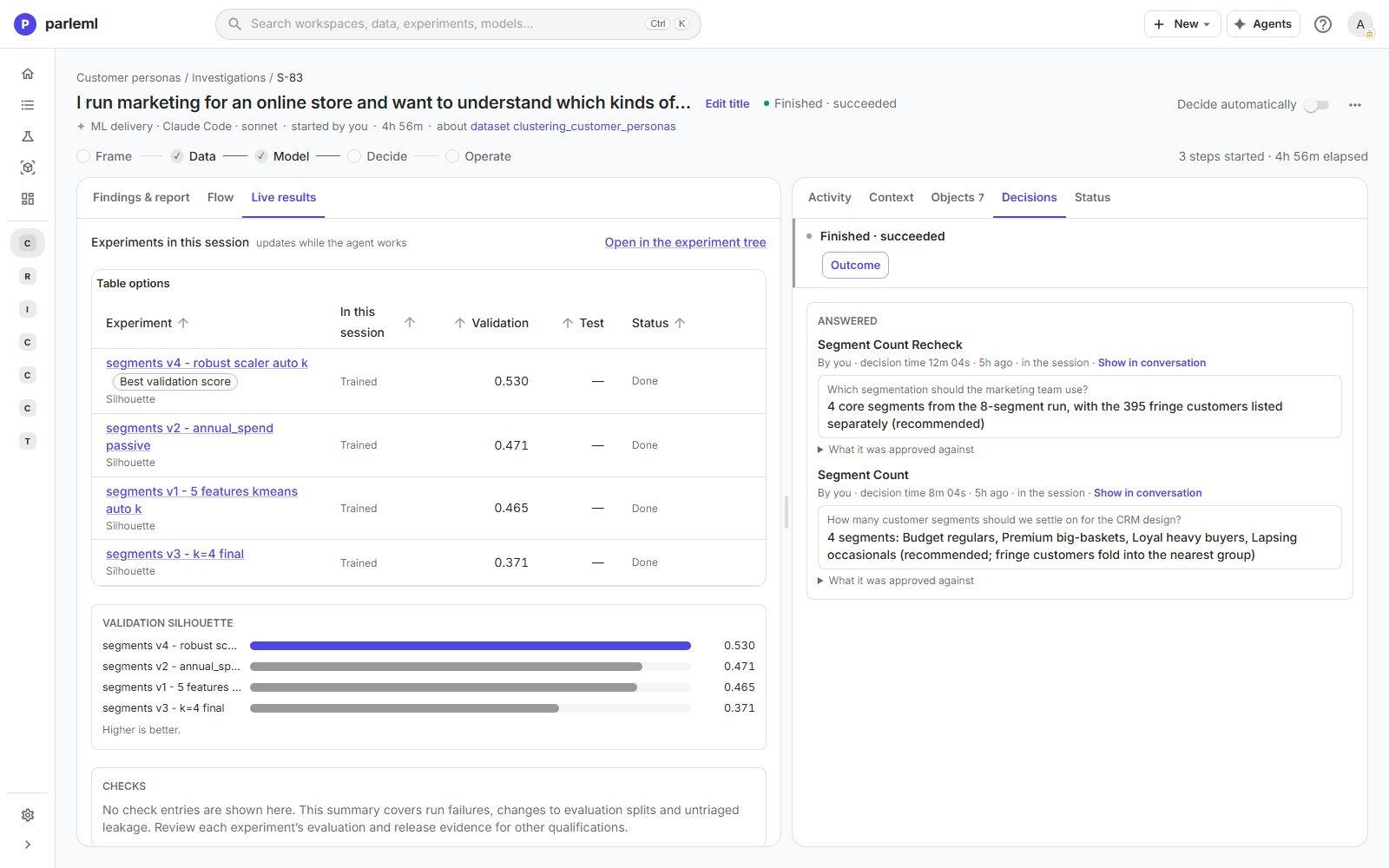
- v1, k-means with automatic k on all five measures: the sweep chose 8 segments, the top of its range, silhouette 0.465.
- v2, one change:
annual_spendis described but not clustered on, because it equals order value × orders per year in every row and so double-counts both. Silhouette 0.471, and about 99% of customers stay in the same segment. The improvement changed nothing, so the stop rule ends iteration.
It then asks Segment Count, with a table of all eight segments, their sizes and averages, and how each lines up with the old persona. Four large groups match the persona almost one to one. Four small ones are defined by a single trait: ordered today, brand new, no orders this year, and tiny baskets. It proposes 4 and says the count is yours.
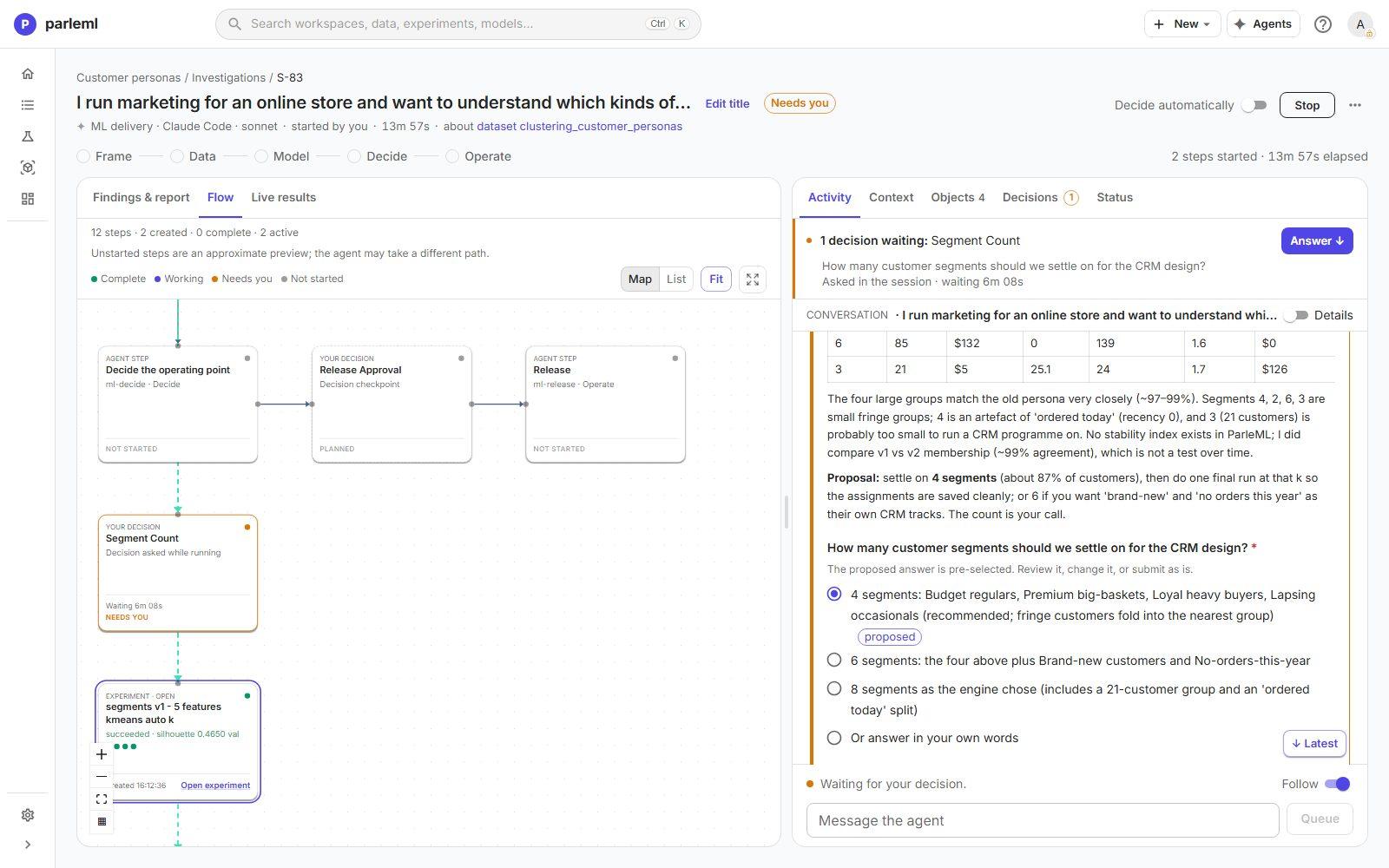
- Read the context above the options first. It states the limits as well as the result: here, that ParleML has no clustering stability measure, and that comparing v1 with v2 is not a test over time.
- Answer 4 and choose Submit answer.
3. See what happens when your answer doesn't hold
The agent fits exactly four segments and checks the result before reporting. It doesn't hold: silhouette falls to 0.371, Budget shoppers merge with Loyalists, Premium spenders merge with Occasionals, and two of the four segments go to the fringe groups.
So the agent doesn't report the four segments you asked for. It asks again: Segment Count Recheck, with the evidence and four options. It recommends the four core segments from the eight-segment run, with the 395 fringe customers listed separately rather than forced into a group.
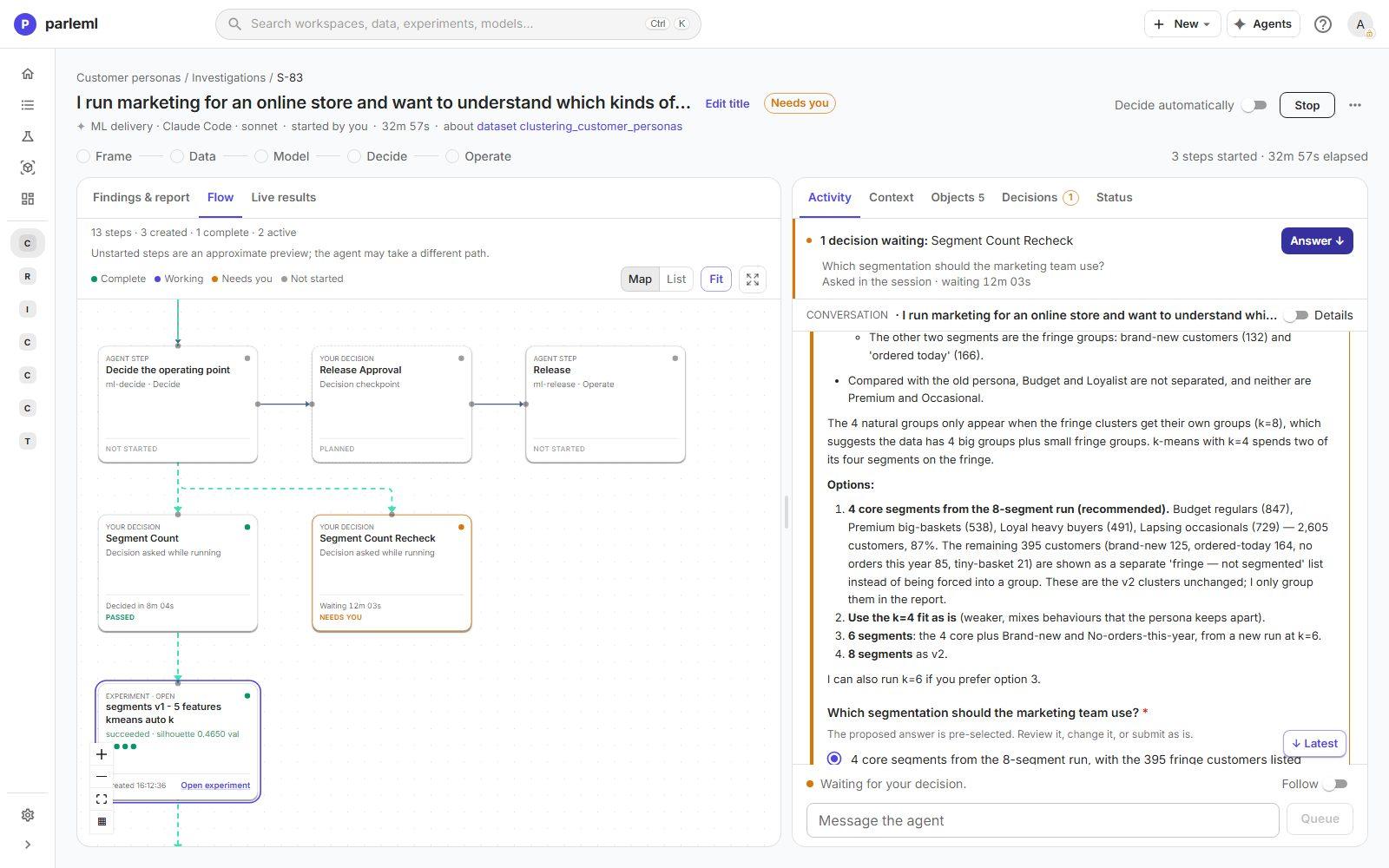
- Answer the recheck. In the recording we accepted the recommendation.
Expect this from the shipped skills: an answer is carried out and then verified, and a result that contradicts the reason for your answer comes back to you.
4. Read the first result
The session ends with four named segments covering 2,605 customers (87%). Step 5 revisits them.
| Segment | Customers | Typical customer |
|---|---|---|
| Everyday Budget Regulars | 847 | $39 orders, about 26 a year |
| Premium Big-Basket Buyers | 538 | $341 orders, 11 a year |
| Loyal Heavy Buyers | 491 | $174 orders, 34 a year, 7 years a customer |
| Lapsing Occasionals | 729 | $110 orders, 4 a year, last order 152 days ago |
The persona cross-check confirms the old classification: 97–99% of each segment carries one persona. The names are the agent's, built from the averages, and the outcome says so.
5. Challenge the method, not only the result
Compare this session with the by-hand run on the same data. By hand, automatic k chose 4 directly, with a silhouette of 0.516. The agent's first run chose 8.
The difference is one setting. The by-hand run kept the default robust scaler; the agent chose quantile scaling. Quantile scaling spreads tied values apart, so a point mass such as "ordered today" (0 days) or "brand new" (tenure 0) becomes a cluster of its own. The agent's "fringe groups" may be partly an artefact of its own choice.
-
On the finished session, type a follow-up under Your turn and choose Send:
A by-hand run on this same sample used the default robust scaler and found four groups directly at k=4 (silhouette 0.516). You used quantile scaling, which spreads tied values such as "ordered today" and "tenure 0" apart. Run one k-means with the robust scaler and automatic k on your four features, compare its membership with your four core segments, and tell me whether the fringe groups belong to the data or to the scaler. Update the report if the answer changes it.
The session reopens with your message and keeps everything already done. The agent runs one more experiment, v4: the robust scaler, automatic k, the same four features.
- Automatic k chooses 4 on its own, silhouette 0.530. The agent notes that silhouettes from different scalers are not strictly comparable, and relies on membership instead.
- 95.5% of the customers in its four core segments (2,489 of 2,605) land in the matching robust segment.
- The 395 fringe customers spread across the four segments. For example, 75 of the 85 with no orders this year join Lapsing Occasionals. "Ordered today" and "brand new" stay useful as CRM flags on top of the segments, not as segments.
- 95.1% of all 3,000 customers carry their segment's majority persona.
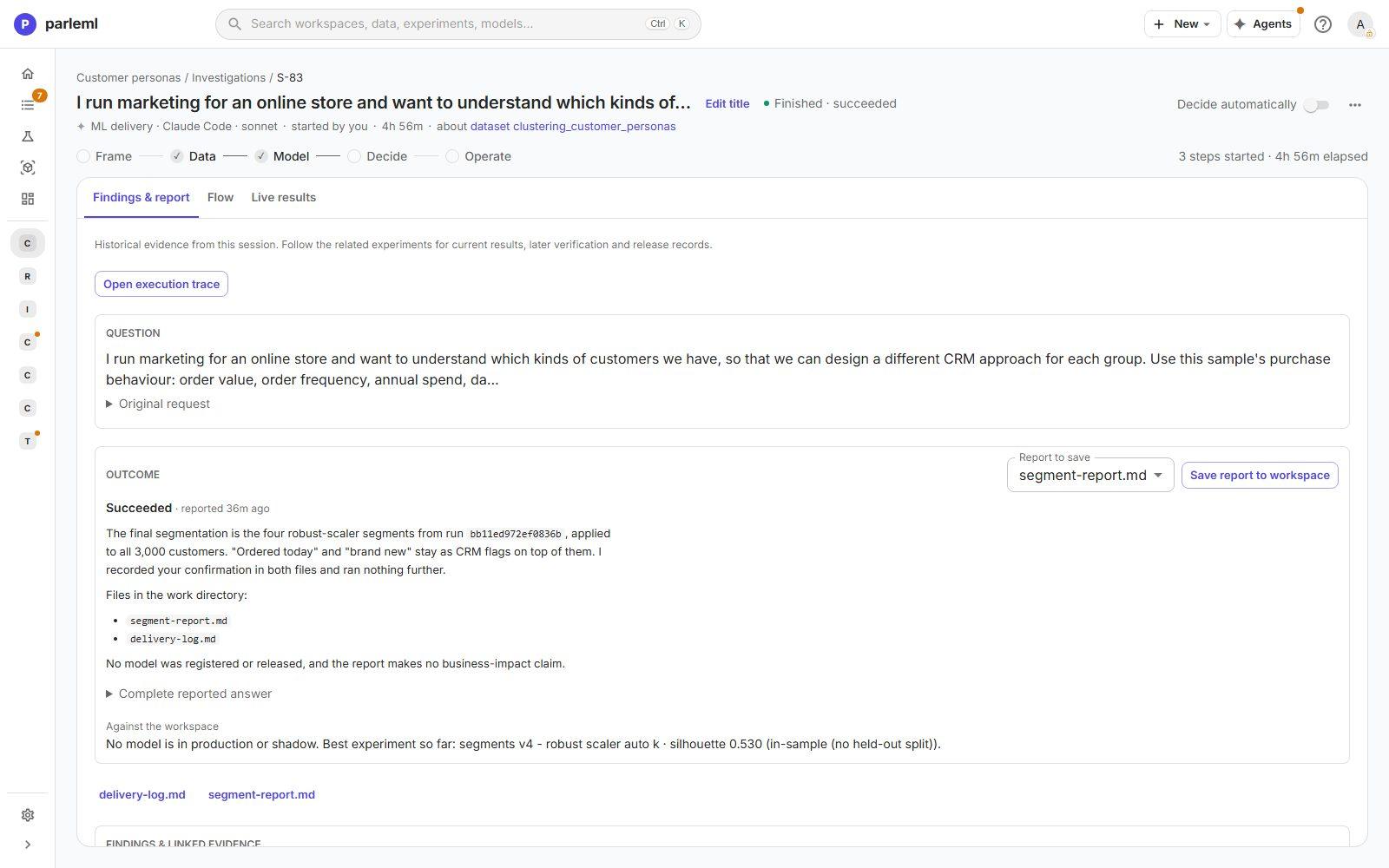
Its conclusion: the fringe groups came from the scaler, not from the data. It adds an
update to segment-report.md recommending the four robust segments for every customer.
Because you approved the earlier handling before this evidence existed, it asks you to
confirm the change.
The final segments, from v4:
| Segment | Customers | Typical customer | Majority persona |
|---|---|---|---|
| Everyday Budget Regulars | 1,068 | $47 orders, about 25 a year | Budget (952) |
| Premium Big-Basket Buyers | 534 | $351 orders, 11 a year | Premium (533) |
| Loyal Heavy Buyers | 562 | $177 orders, 33 a year | Loyalist (540) |
| Lapsing Occasionals | 836 | $109 orders, 4 a year, last order 159 days ago | Occasional (829) |
The lesson reached the product too: the agents' clustering playbook now tells them to start on the robust scaler, and says what quantile scaling does to tied values.
6. Close the session
-
Send one more follow-up:
Confirmed: use the four robust segments for all 3,000 customers, and keep "ordered today" and "brand new" as CRM flags on top of them. No further runs are needed.
The agent records your confirmation in the report and the log, runs nothing more, and finishes. The stage strip shows Data and Model, the stages its work reached. The release steps on the flow read Not run as a step and Not asked, because the brief ruled out a release.
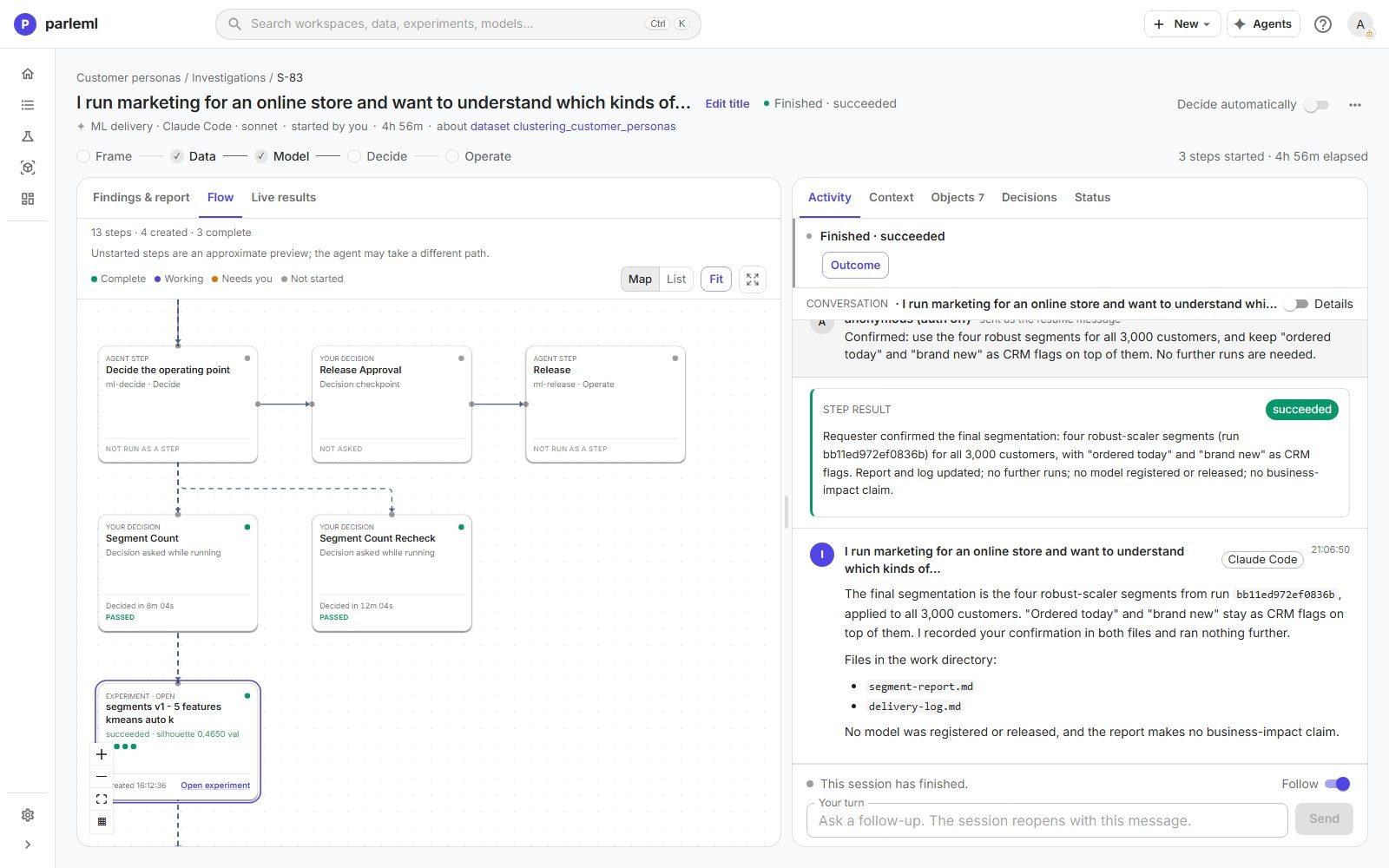
- In Findings & report, pick
segment-report.mdand choose Save report to workspace. It goes to the workspace's Documents. - Open Live results for the four experiments with their silhouettes, and Decisions for both answers with the questions as they were asked.
What to take from this
- Write limits into the brief: what not to use, when to stop, what you decide, where it ends.
- Read a decision's context before its options: the limits are stated there.
- Expect your answers to be verified, and a contradiction to come back to you.
- Check a surprising result against a simpler run, by hand or by asking. A follow-up on a finished session is cheap, and its reasoning is recorded with the rest.
Next
- Take a forecast from review to production: an agent review that ends in a release you approve.
- Workspaces and sessions: how sessions, decisions and follow-ups work.