Run ParleML
Time: about 5 minutes, plus the download · You need: Docker Desktop
(Windows or macOS) or Docker Engine (Linux), and 8 GB of free memory.
You'll end with: ParleML open at http://localhost:8000, with an agent ready to work.
ParleML is one container: the app, its API, the machine-learning engine and the documentation you are reading. There is nothing else to install.
1. Start the container
docker run -d --name parleml -p 8000:8000 \
  -v parleml-data:/app/data_root \
  ghcr.io/parleml/parleml:0.8.0
docker run -d --name parleml -p 8000:8000 `
  -v parleml-data:/app/data_root `
  ghcr.io/parleml/parleml:0.8.0
The first run downloads the image (about 7.7 GB once unpacked). -v parleml-data:/app/data_root keeps
your workspaces, models and settings in a Docker volume named parleml-data, so they
survive when the container is removed or upgraded.
On a Mac with Apple silicon (M1 and later)
The image is built for Intel/AMD (linux/amd64). Docker Desktop runs it through
emulation: open Docker Desktop → Settings → General and turn on Use Rosetta for
x86_64/amd64 emulation, then add --platform linux/amd64 to the command above.
Give Docker at least 8 GB under Settings → Resources. Training is slower than on a
native machine, but everything works.
2. Open it
Go to http://localhost:8000. The app is ready when Home shows its welcome card. On a laptop this takes about a minute after the container starts.
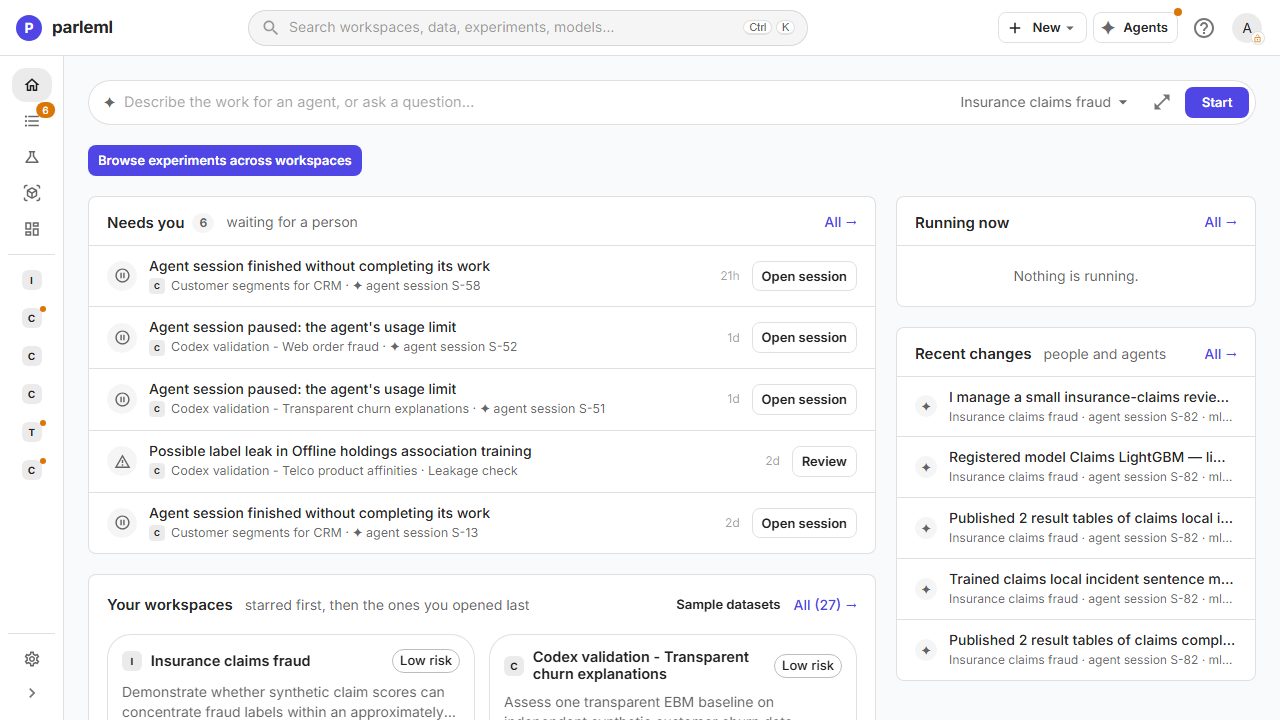
You can use every part of ParleML now: open a sample, explore it, train and explain models by hand. Your first model shows how.
3. Sign in an agent (optional, recommended)
Agents frame your problem, build and explain models, and ask you before anything that matters. They run on an agent CLI inside the container, signed in with your account or API key. ParleML never sees or stores the key.
Use the AI subscription you already pay for
If you have a ChatGPT, Claude or Google AI plan, the agents can run on it: a fixed monthly price instead of a per-token bill. An ML session reads a lot of results, which adds up fast on an API key, so a subscription is usually the cheapest way to work with agents. If the plan's usage limit is reached, the session pauses, and it can resume by itself once the limit resets.
The image includes Codex and Gemini CLI. Pick one:
Sign in once inside the container, and keep the login in its own volume. Start the container with that volume added:
docker rm -f parleml
docker run -d --name parleml -p 8000:8000 \
  -v parleml-data:/app/data_root \
  -v parleml-codex:/root/.codex \
  ghcr.io/parleml/parleml:0.8.0
Then sign in:
docker exec -it parleml codex login --device-auth
It prints a link and a short code. Open the link, sign in with the ChatGPT account on your plan, and enter the code. Your data stays in its own volume throughout.
With a Google account, use Gemini CLI instead: add -v parleml-gemini:/root/.gemini, run
docker exec -it parleml gemini and choose Sign in with Google. For a Claude plan, see
Use Claude Code below.
Remove the container and start it again with the key in its environment. Your data stays in the volume.
docker rm -f parleml
docker run -d --name parleml -p 8000:8000 \
  -v parleml-data:/app/data_root \
  -e OPENAI_API_KEY=<your-openai-key> \
  ghcr.io/parleml/parleml:0.8.0
For Gemini CLI, use -e GEMINI_API_KEY=<your-gemini-key> instead. On a team server, use a
key that belongs to the team: every session on the server uses it.
Check it in the app: Settings → Agents shows the agent as signed in.
Use Claude Code, Cursor or extra libraries
Some options are not in the standard image because of their licence or size: Claude Code, Cursor, the names-dataset corpus and the fast.ai model family. Build your own image on top of the standard one with a single command. It reads the recipe from the image itself, so you don't need anything else:
docker run --rm ghcr.io/parleml/parleml:0.8.0 cat /opt/parleml/Dockerfile.extended \
  | docker build --build-arg WITH_CLAUDE=1 -t parleml-claude -
Add --build-arg WITH_CURSOR=1, --build-arg WITH_NAMES=1 or --build-arg WITH_FASTAI=1
for the others. Then run parleml-claude instead of the standard image, with Claude Code as
the default agent and its login kept in a volume:
docker run -d --name parleml -p 8000:8000 \
  -v parleml-data:/app/data_root \
  -v parleml-claude:/root/.claude \
  -e PARLEML_AGENTS_HOST_ADAPTER=claude-cli \
  parleml-claude
Sign in with your Claude Pro or Max plan, so sessions draw on your subscription (run claude,
then type /login), or pass -e ANTHROPIC_API_KEY=<your-key> to docker run instead:
docker exec -it parleml claude
Everyday commands
| To | Run |
|---|---|
| Stop ParleML | docker stop parleml |
| Start it again | docker start parleml |
| See what it is doing | docker logs -f parleml |
| Upgrade to a new version | docker rm -f parleml, then the docker run command with the new tag. Your data is in the volume. |
Something went wrong?
- The page does not load. Wait a minute and refresh.
docker logs parlemlshows the server starting; it is ready at the lineApplication startup complete. - Port 8000 is taken. Use
-p 8080:8000and openhttp://localhost:8080. - Training stops with an out-of-memory error. Give Docker more memory (Docker Desktop → Settings → Resources), or pick a lighter template such as Quick Explore.
- An agent session says the agent is not signed in. Repeat step 3, then check Settings → Agents.
Install and operate ParleML covers backups, upgrades, a reverse proxy, single sign-on, GPUs and MaxMind geolocation data.
Next
Your first model: train and explain a churn model in 10 minutes.