User manual
In short
- This manual explains every part of the app, so you can apply ParleML to your own data.
- New here? Start with Get started: you'll have ParleML running and a first model explained in about 15 minutes.
- Everything happens inside a workspace: one business problem with its data, experiments, models and sessions.
- You can let an agent do the work or do each step yourself. Both leave the same record, and a person always makes the consequential choices.
First time?
The manual is for when you know what you want to do and need the detail. To learn by doing, go to Get started first, then the longer tutorials.
Find your page
| You want to… | Read |
|---|---|
| Set up a business problem, or work with an agent | Workspaces and sessions |
| Add data, set column roles, check for leakage | Datasets and columns |
| Pick the right kind of model for your question | Which experiment fits my question? |
| Configure and launch training | Experiments |
| Read a classification or regression result | Results and evidence |
| Read a forecast, anomaly, clustering, recommendation, ranking or association result | Results for other kinds |
| Decide whether a change helped | Compare |
| Register, review and release a model | Models and release |
| Connect agents, choose profiles, add skill packs | Settings and agents |
| Manage who can do what, and where data lives | Access, permissions and data |
How the parts fit together
A workspace holds one business problem. Its sidebar lists everything inside it.
| Object | What it is | Where to find it |
|---|---|---|
| Workspace | A business problem: its goal, risk level, intended use, and the profile that governs its agents. | Workspaces, or Home |
| Knowledge base | Your raw tables and how they relate, plus the recipes that turn them into training datasets. | Workspace → Knowledge bases |
| Dataset | One table you train on, with column roles, quality checks and exploration views. | Workspace → Datasets |
| Experiment | A configured, measured attempt to answer one question on a dataset: a classification, a forecast, a clustering and so on. Each execution is a run. | Workspace → Experiments |
| Model | An experiment's fitted model that you registered, with its stage and release record. | Workspace → Models |
| Session | An agent working on a task, with its steps, questions and outcome. | Workspace → Investigations |
| Decision | A question an agent asked a person, and the answer. | Workspace → Decisions |
| Document | A report published from a session or an experiment, with its versions. | Workspace → Documents |
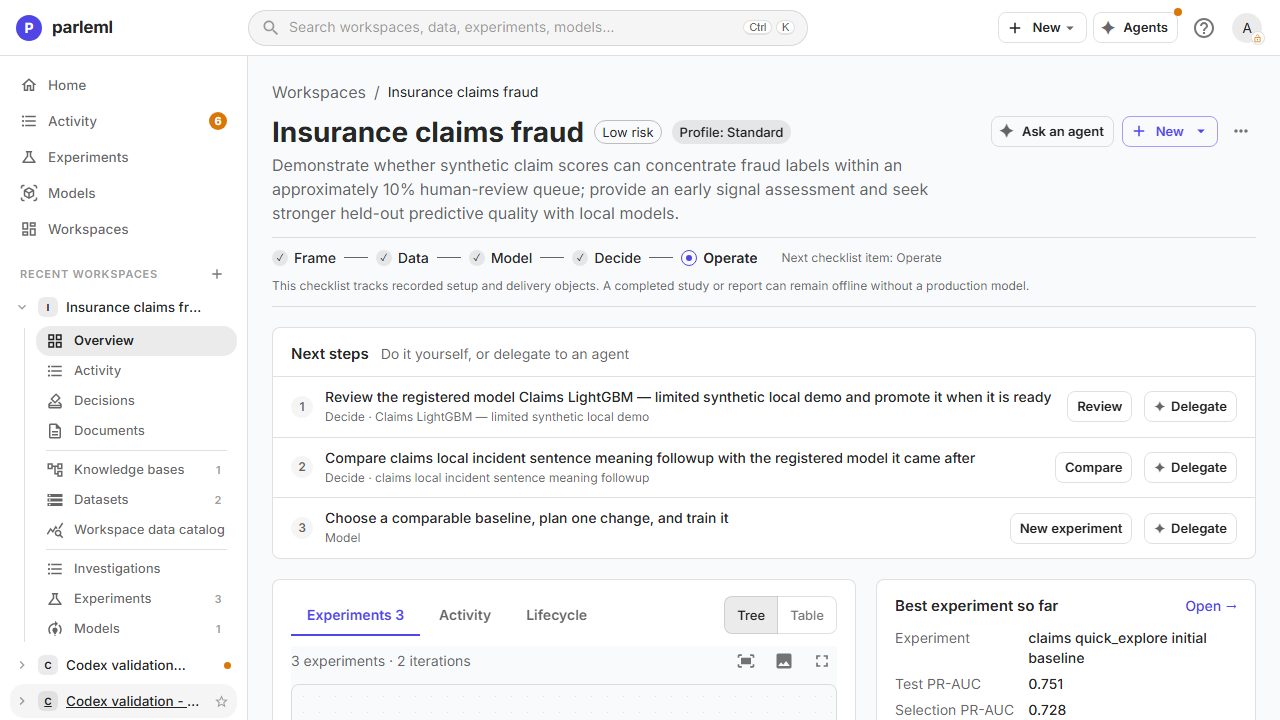
The sidebar groups them in three blocks: Overview, Activity, Decisions and Documents; then Knowledge bases, Datasets and Workspace data catalog; then Investigations, Experiments and Models.
Two ways to work, one record
Describe what you want and let an agent do the work, or do each step yourself. Both produce the same objects, so you can switch at any point.
| Step | With an agent | By hand |
|---|---|---|
| Frame the problem | State the goal and constraints in the brief | Workspaces → New workspace, then fill in the goal, risk and intended use |
| Understand the data | The agent proposes column roles, explores the data and reports leakage | Review Columns, Leakage and Charts |
| Train | The agent picks a template and launches an experiment | New experiment: pick a template and launch |
| Judge | The agent summarises the result and publishes a report | Read the evaluation and the explanations |
| Choose | The agent compares and recommends | Compare |
| Release | The agent registers a model and asks you to approve | Register, review the release record, promote |
Starting with an agent is the quickest way in (Work with an agent). The manual path is always there. Either way, a person approves a release, promotes a model and deletes anything.
Where the work stands
A workspace header shows five steps: Frame → Data → Model → Decide → Operate. Each step ticks once its record exists. It is a checklist, not a promise about the work: a finished study or report can stop without a production model.
The Next steps list on the workspace overview suggests what to do next. Each step has a button to do it yourself and a Delegate button that hands it to an agent.
Things to keep apart
- Task and template. A task, or skill, guides an agent's work. An experiment's template sets its training configuration. They are different choices.
- Validation and test scores. Validation scores choose a model. The test score, on rows the model never saw, is the honest estimate. See Results and evidence.
- A trained model and a released model. An agent can train and register a model and save a report. That is not a release; see Models and release.
- A budget and a deadline. A training budget covers model selection. Preparation, refitting and explanations can add time.
For the Python libraries and tools behind each step, see the API reference.
Next
- Get started: run ParleML and train your first model.
- Workspaces and sessions: the first chapter of the manual.