Models and release
In short
- A model is an experiment's fitted pipeline, registered so it can be reviewed, staged and used. You can also import one trained elsewhere.
- ParleML keeps three things apart: registration (the model exists), release (people judged it fit for a stated use) and lifecycle stage (where it is in its life).
- Stages run Trained → Validated → Promoted → Shadow → Production → Archived. Only a person moves a model between them.
- Take a model out as a Python scoring package, or as an MLflow model when the run is tracked in MLflow.
Register a model
Open a succeeded experiment and choose ⋯ → Register as model in its header. The primary button beside it is Compute explanations and then Review evidence, so you judge the model before you register it, but registering does not wait for either. Give the model a Model name, and optionally a Risk level, an Owner and Notes. An agent can register a model too; the model then records the skill and session that made it.
To bring a model trained elsewhere, use New → Import model and pick what you have:
- Model artefact (joblib / pickle). ParleML recognises CatBoost, LightGBM, XGBoost and
scikit-learn tree ensembles natively. It falls back to any scikit-learn estimator with
predictandpredict_proba. - Predictions CSV (frozen scores), when the model itself cannot be shared.
Then fill in what makes the explanation and drift views work:
- a Reference dataset;
- the Prediction column and the Label column (the label enables metrics and error analysis);
- the task (Binary classification or Regression) and, for binary, the Positive class;
- the protected attributes for fairness.
An imported model's provenance says it was imported.
The models list
Models in the sidebar lists every registered model in every workspace. Each workspace's own Models section lists its models, with Compare and Import model.
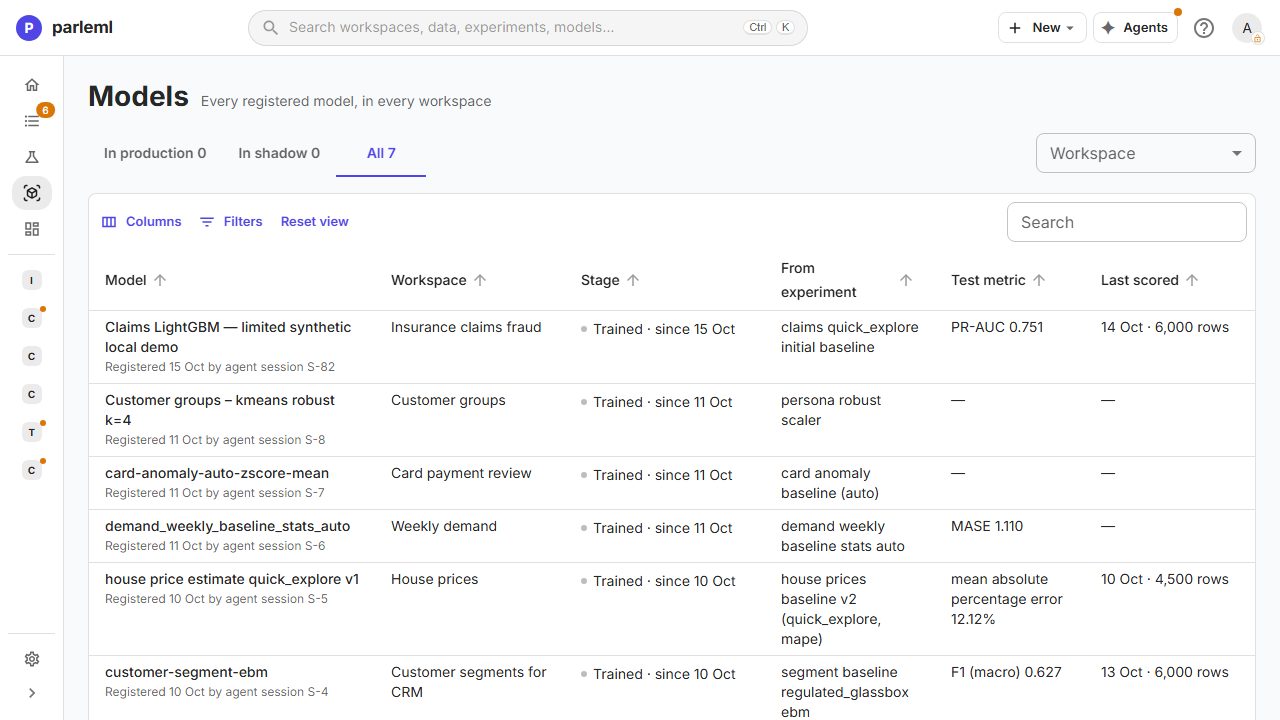
Each row shows the stage, workspace, source experiment and test metric, and when the model was last scored and on how many rows. The counts at the top say how many models are in production and in shadow.
The model page
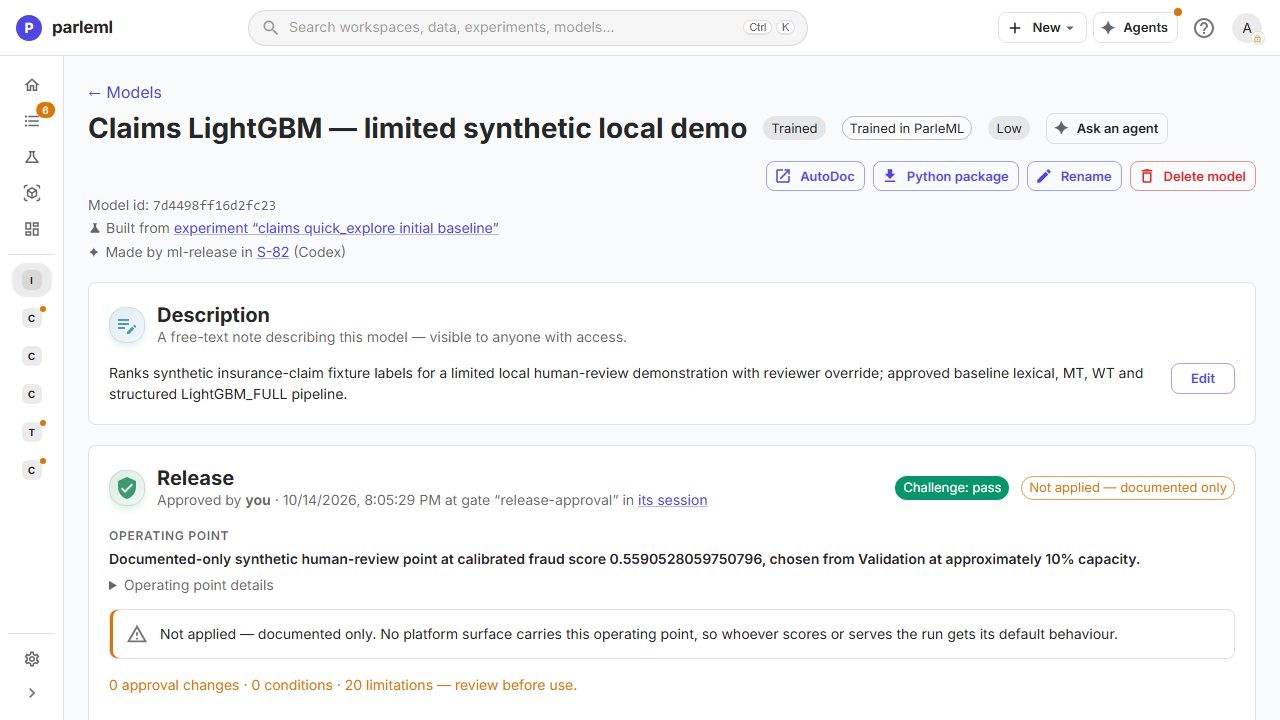
- Header: the name, stage, provenance (Trained in ParleML or imported), the experiment it was built from and the session that made it. AutoDoc opens the model card, Python package downloads the scoring package, and Rename and Delete model are here too.
- Description: a free-text note that anyone with access can read.
- Release: the release record (see below).
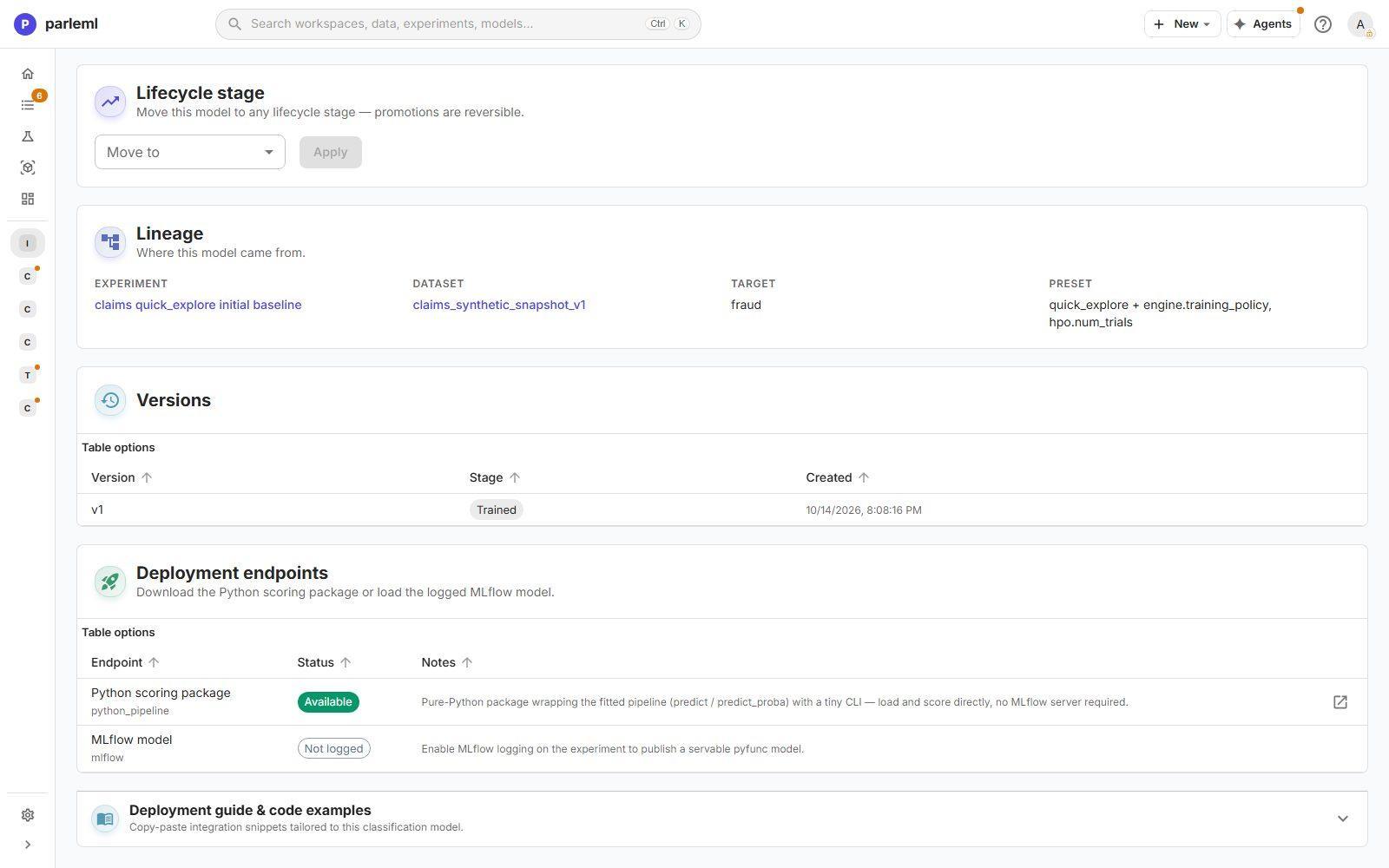
- Lifecycle stage: pick a stage under Move to, then choose Apply. The model's Risk level is edited here too.
- Lineage: the experiment, dataset, target, preset (with what was changed on top of it) and seed, each linked.
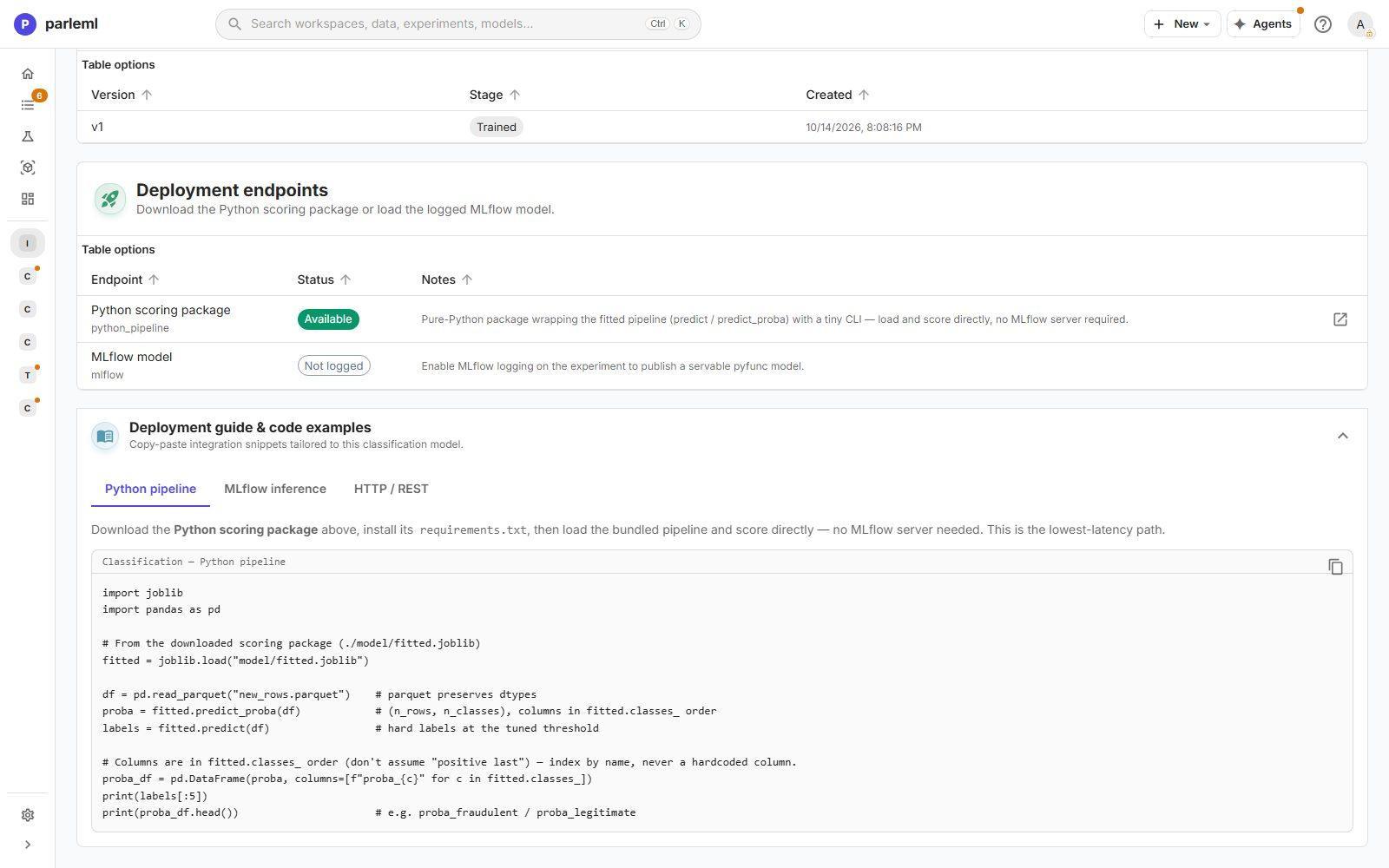
- Versions: each version, with its stage and creation time.
- External dependencies: systems outside this server that the model calls at every scoring call, if any.
- Deployment endpoints: each way the model can be taken out, and whether it is available now.
- Deployment guide & code examples: integration code written for this model.
Lifecycle stages
| Stage | Meaning |
|---|---|
| Trained | Registered from an experiment. Nothing has been judged yet. |
| Validated, Promoted | Review stages in between. What each one requires is your organisation's process; the versions table records each version's stage. |
| Shadow | Scores alongside the production model for comparison, without being used. |
| Production | The model your business process uses for its predictions. |
| Archived | Retired, with its history kept. |
You can move a model to any stage, and every move can be undone. Only a person moves a model: agents and API tokens cannot change its stage, and they cannot delete it. To retire a model but keep its history, archive it instead of deleting it.
The release record
A release record is the documented result of a release review. It is kept against the experiment and the model. It is separate from the lifecycle stage: a model can carry a release record and still sit in Trained, as the claims model in the screenshots does.
The record shows:
- Approval: who approved, when, and at which decision of which session. The answers are kept in that session's Decisions, with what they were approved against.
- Challenge: whether an independent challenge of the evidence passed.
- Operating point: the threshold at which the model is to be used, and how it was chosen. In the example: calibrated fraud score 0.559, chosen on validation rows for about 10% review capacity.
- Applied, or Not applied — documented only: whether any part of the platform uses that operating point. A documented-only point is written down, but whoever scores or serves the model gets its default behaviour. Do not assume a documented threshold is in force.
- Approval changes, conditions, limitations & history, counted and expandable.
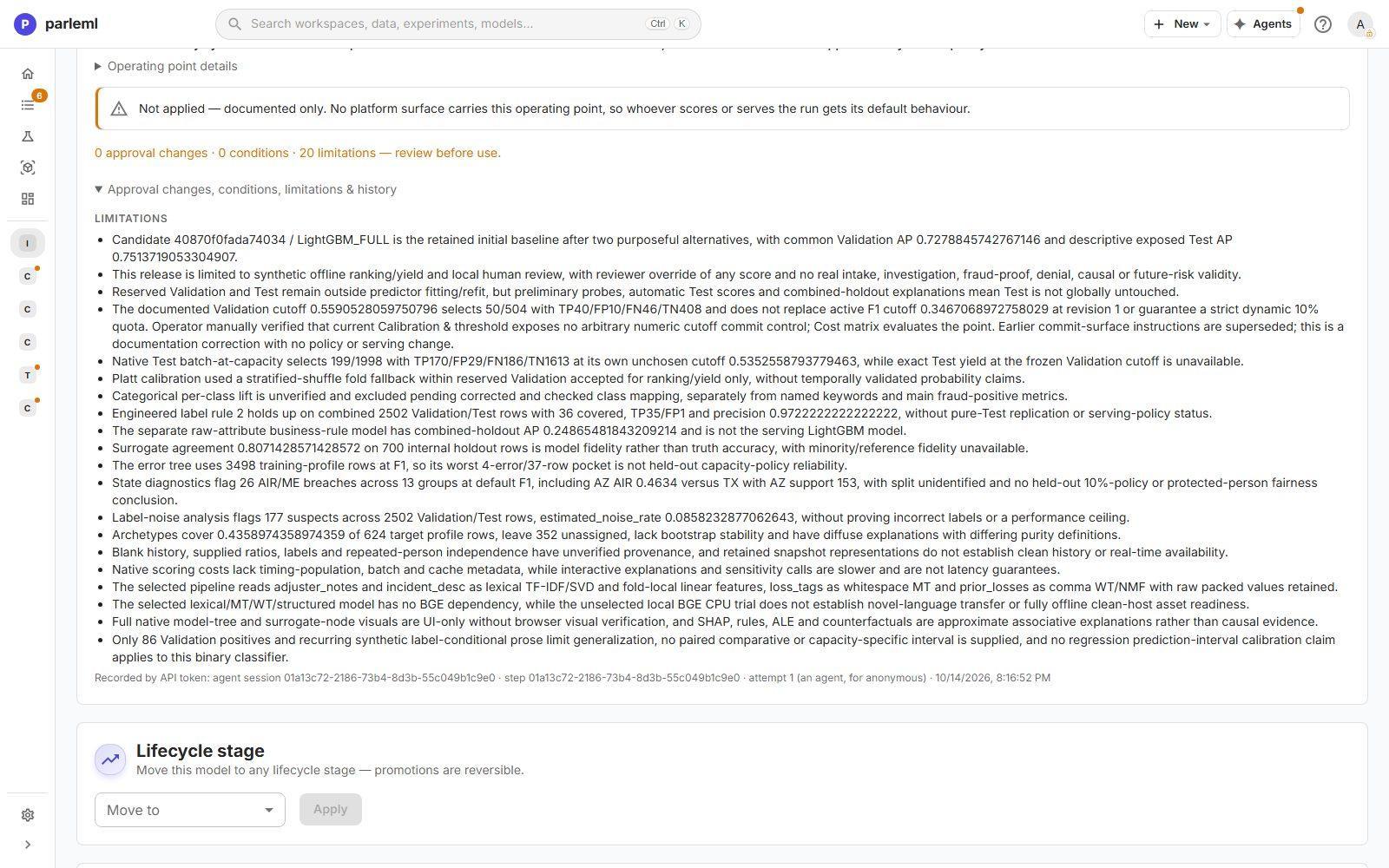
Limitations are specific, not boilerplate. The claims release lists 20, including:
- the scope: synthetic, offline, ranking only, local human review with reviewer override;
- that the test set was not untouched, because earlier probes read it;
- exactly how many cases the documented cutoff selects on validation;
- that the cutoff does not replace the active one.
Read them before you use the model.
Approval is a person's act
An agent can prepare a release, challenge it, write the report and ask for approval. The approval itself comes from a person, at a decision in the session, and a person moves the stage. A model an agent saved is not released.
Use the model
| Endpoint | What it is |
|---|---|
| Python scoring package | A pure-Python package around the fitted pipeline (predict, predict_proba), with a small command-line tool. Load it and score directly, with no server. The lowest-latency path. |
| MLflow model | A servable MLflow model, logged when the experiment is tracked in MLflow (below). It is not a download: load it from its MLflow run or registry with the standard MLflow API. |
Deployment guide & code examples gives copy-paste code for this model's task in three forms: Python pipeline, MLflow inference and HTTP / REST. The Python example loads the bundled pipeline, reads new rows, and returns probabilities in the model's class order and labels at the tuned threshold. It reminds you to index probabilities by class name, never by position.
Inside ParleML, the experiment's Decision & use tab scores single records (Inference) and whole datasets (Batch & Diagnose), with reason codes. Watch Drift afterwards, and compare new data with the training data under Compare datasets. Score new data walks through it.
For serving and export in depth, see the ML4 deployment guide, inference and fast scoring and MLOps (MLflow and Unity Catalog).
Track a run in MLflow
ParleML can log a classification, regression, forecasting, clustering or anomaly-detection run to MLflow. The fitted pipeline then also exists as a standard MLflow model that other tools can load, serve or register. Tracking is optional and best effort: it never changes what the run produces.
Turn it on in one of two ways:
- For the installation: add an MLflow connection under Settings → Connections, with
the Tracking URI, an optional Registry URI (
databricks-ucregisters in Unity Catalog), an optional token (kept in the vault) and an optional Default experiment name. Turn on Log new experiments by default to track every run that does not choose for itself. An installation has one MLflow connection. - For one run: the launch request's
mlflowblock (through the API or an agent), withenabledand optionallyexperiment_name,run_name,model_nameand the Unity Catalog fields.
Where the runs go. To the connection's tracking server. The environment variables
MLFLOW_TRACKING_URI, MLFLOW_REGISTRY_URI and MLFLOW_TRACKING_TOKEN, when set on the
server, take precedence over the connection. With neither, a run that asks for MLflow writes to
a local store, mlflow in the data root (in the Docker image, on the data volume), so it
survives restarts.
The image carries the lightweight MLflow build: the client, the registry and the model
wrapper, without the tracking server or its web interface. To browse a local store with
mlflow ui, install the full mlflow package wherever you copy it.
Details: what a classification or regression run logs
- Parameters: the experiment id, dataset, target and task.
- Metrics: the validation and test scores.
- The model, at
runs:/<run id>/model, with its input and output signature and its requirements pinned, including the exactml4release that fitted it.
The run id is stored on the experiment and shown with the model.
Forecasting runs log the forecast pipeline as a servable model with its own parameters and metrics. Clustering and anomaly runs log their parameters, metrics and plots, and a servable model when the detector can score new rows.
Registering. A classification or regression model is registered in the MLflow registry
during the run when the run names one (model_name) or asks for Unity Catalog. Otherwise it is
registered when you register the model in ParleML, so each model gets one registry version.
This needs an MLflow connection (or MLFLOW_TRACKING_URI); runs in the local store are not
registered. Once a model has a registry version, moving its stage in ParleML moves that version
too: Validated,
Promoted and Shadow map to MLflow's Staging, Production to Production and
Archived to Archived.
Loading it elsewhere. The environment that loads the model needs the same ml4 release,
because the model carries its requirements, not ml4's code. See
MLOps (MLflow and Unity Catalog).
When MLflow is not available. If MLflow is not installed on the server, the tracking server cannot be reached, or logging fails, the run still finishes with complete results. For classification and regression, the run's events show a warning, This run was not tracked in MLflow, with the reason; for the other kinds, the server log says why. Association, ranking and recommendation runs are not logged to MLflow.
Next
- Use your model: score new rows and download the package.
- Score new data: batch scoring, reason codes and drift.